macOS app
Open source (MIT)
Reformule: correct text in any macOS app, formatting intact
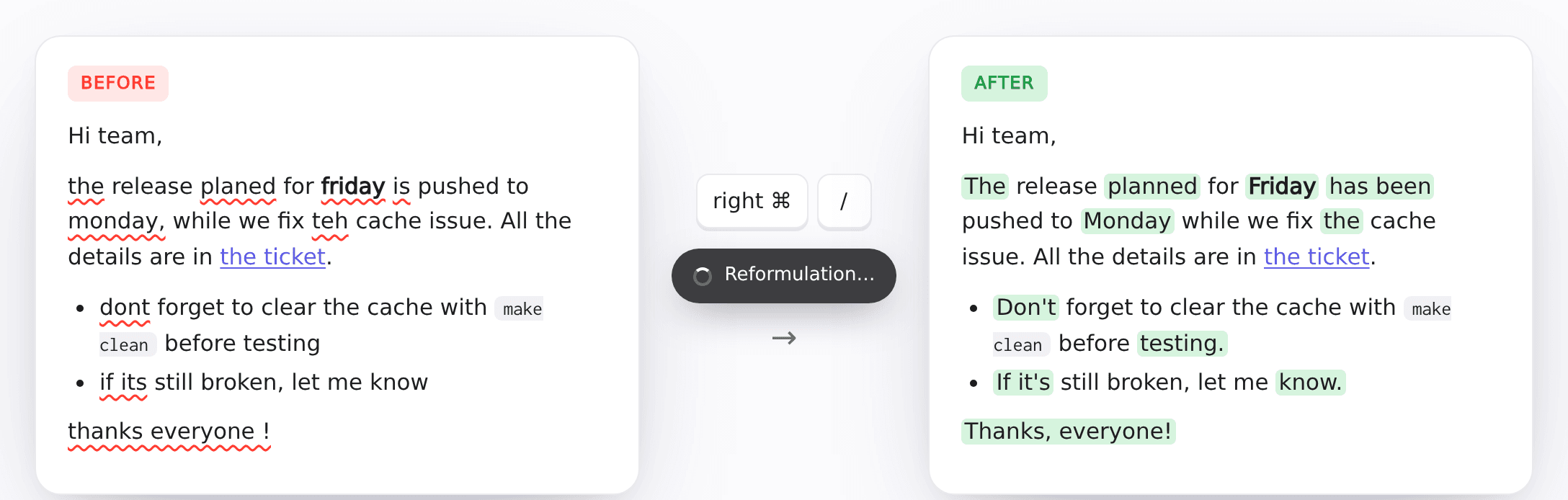
Reformule is an open source macOS app, under the MIT license, that corrects and rephrases the text of the focused field, from Slack to Jira, with a keyboard shortcut or a right-click. Bold, italic, links, code and lists stay in place. Text is corrected in its own language, never translated, and its tone is kept.
3.2 s
to correct the example on the project page with Opus (real output)
Public code on GitHub, under the MIT license. You build the app on your own Mac. The interface is in French for now.
The idea
No copying to another tool and back: the correction happens in place, in the field you are typing in. A shortcut (right ⌘ + / by default) copies the selection, or the whole field when nothing is selected, has it corrected by Claude through Claude Code, then shows the changes in a card next to the text (deletions struck through, additions highlighted). Return or “Remplacer” pastes the corrected text in place; Esc dismisses it. Only the right-click menu (Services) replaces the selection directly, without a card.
What it does
- Keyboard shortcut of your choice, recorded from the keyboard, telling left and right keys apart
- A card next to the text shows the changes before anything is replaced
- Two entries in the right-click Services menu, "correct and rephrase" and "correct only", which replace the selection without going through the clipboard
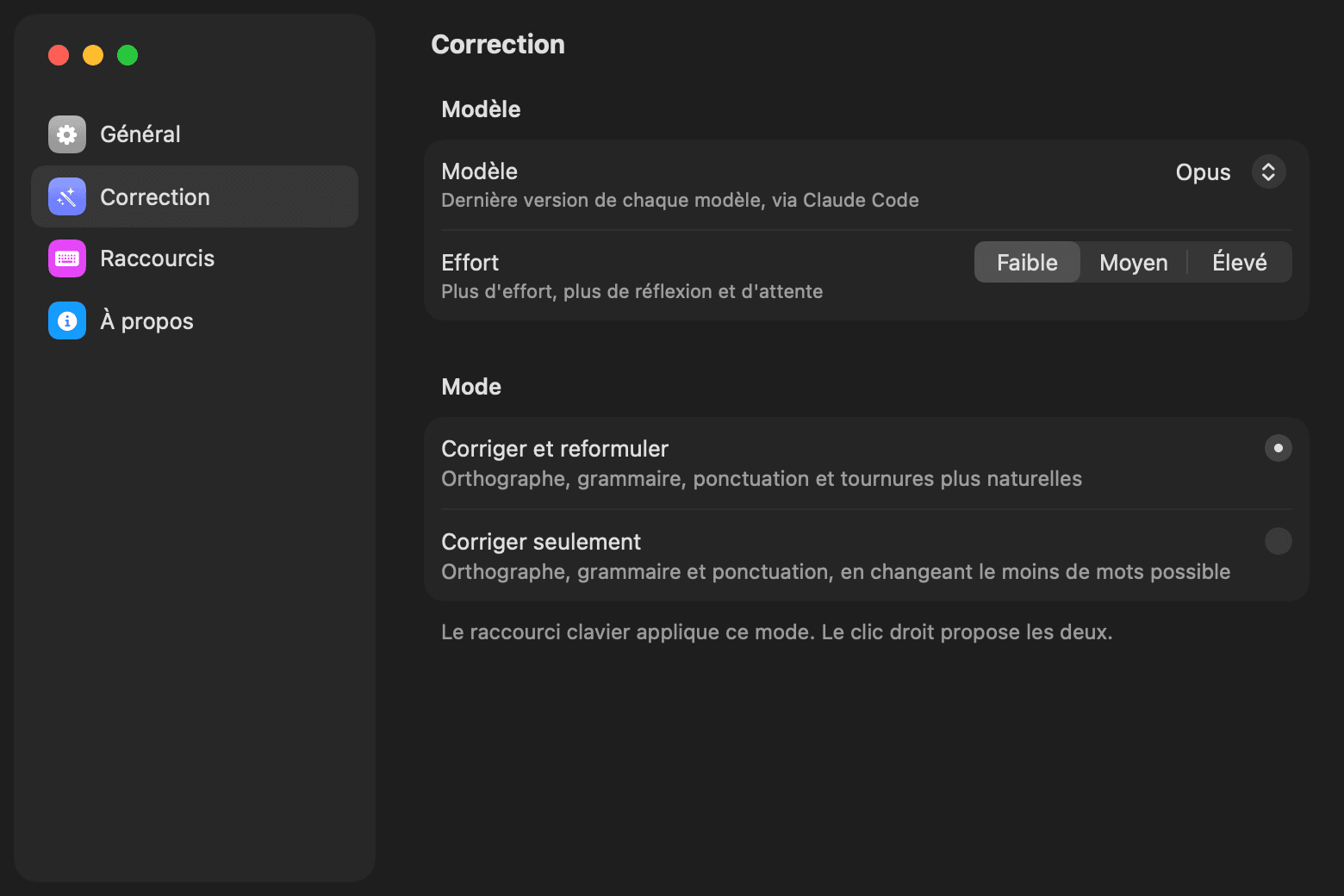
- Two modes: correct and rephrase for more natural wording, or correct only to change as few words as possible
- Bold, italic, links, code, bulleted, numbered and nested lists kept
- Text corrected in its own language, never translated
- Choice of model (Fable, Opus by default, Sonnet or Haiku) and effort (low by default, medium or high)
- Launch at login
How the formatting is kept
The structure never goes through the model. Reformule splits the text into blocks (paragraphs, bullets, numbered items) and keeps the structure itself. URLs and code are replaced by tokens the model must copy back as is. A block whose formatting markers or tokens changed is left as it was. Reformule then rebuilds the HTML, RTF and plain text, pastes with ⌘V and restores the original clipboard.
Privacy
Text is sent to Anthropic by Claude Code, with the signed-in account, and counts against its subscription or billing. Reformule has no server and no telemetry, and keeps no session. Claude Code is a gateway to the Claude models: the call uses no tools, no MCP servers, and neither the user's CLAUDE.md nor their hooks.
Install
You need macOS 26 on Apple silicon, Claude Code installed and signed in, and the Xcode Command Line Tools. Clone the repository, then run ./build.sh install. The app is signed ad hoc: after every build, macOS treats it as a new app, and the Accessibility permission, needed for the keyboard shortcut, has to be granted again. The right-click menu works without it.
Limitations
- Content with images, image emoji or tables is not modified
- Underline, strikethrough and colors are lost
- Apps that replace the context menu, like many Electron apps, do not show Services: only the shortcut works there
- In VS Code and JetBrains, ⌘C without a selection copies the current line: that line is what gets corrected
Screenshots
Technical stack
// faq
FAQ
What do I need to use Reformule?
An Apple silicon Mac on macOS 26, Claude Code installed and signed in, and the Xcode Command Line Tools to build the app.
How do I install it?
Clone the GitHub repository, run ./build.sh install, then allow Reformule in System Settings > Privacy & Security > Accessibility for the keyboard shortcut.
Where does my text go?
To Anthropic, through Claude Code, with your signed-in account. It counts against your subscription or billing. Reformule has no server and no telemetry, and keeps no session.
Does Reformule translate the text?
No. Text is corrected in its own language, and its tone is kept.
Is the interface available in English?
Not yet: the interface is in French for now.
Is the code public?
Yes, on GitHub, under the MIT license.
A similar need?
30 minutes to look at your situation and tell you honestly how I would approach it, whether you work with me or not.